






Course Overview
Structured into 37 in-depth modules, the Professional Photography Diploma offers comprehensive training in photography—from beginner to professional level. Topics include:
- Understanding DSLR, mirrorless, and smartphone cameras
- Exposure, white balance, focus, and lighting
- Portrait, landscape, street, event, and product photography
- Editing with Photoshop, Lightroom, Snapseed, and mobile tools
- Business essentials: pricing, branding, and selling stock photos
- Building a professional portfolio and working with clients
Whether you’re looking to become a freelance photographer, start a content creation business, or work with agencies, this Professional Photography Diploma provides the foundation to succeed.
Learning Outcomes
By the end of the Professional Photography Diploma, you will be able to:
- Operate a camera confidently in manual and auto modes
- Apply photography principles across various styles and settings
- Edit images using Photoshop CC, Lightroom, Snapseed, and more
- Use lighting and composition to enhance visual storytelling
- Build and present a professional portfolio for clients or employers
- Launch a freelance photography business and sell your work online
Understand copyright, image licensing, and pricing strategies
Why Enrol in This Course?
By enrolling in the Professional Photography Diploma, you gain career-ready photography skills that align with UK industry standards. Whether you’re a beginner, creative freelancer, or professional content creator, this CPD photography course helps you:
- Learn at your own pace, anytime, anywhere
- Access course materials from desktop, mobile, or tablet
- Receive a CPD QS Accredited Certificate to boost your CV
- Build a portfolio and skillset from scratch
- Learn how to start a photography business or offer freelance services
Who is This Course for?
The Professional Photography Diploma is ideal for:
- Beginners and aspiring photographers seeking structured training
- Creative professionals wanting to expand into visual media
- Freelancers and entrepreneurs building a photography service
- Social media influencers and content creators seeking quality images
- Bloggers and marketers managing their own brand visuals
Prerequisites for This Course
There are no formal entry requirements. This Professional Photography Diploma is open to:
- Anyone passionate about photography
- Learners with basic digital literacy
- Users of DSLR, mirrorless, or smartphone cameras
Certification
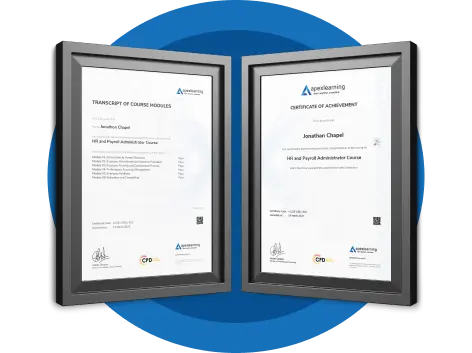
Upon completing the course and passing the final exam, you will receive a CPD QS Accredited Certificate from Apex Learning. The Digital version of the certificate is available for £9.99 only, and you can order a hard copy of the certificate for £14.99 only.
Endorsed Certificate from the Quality Licence Scheme
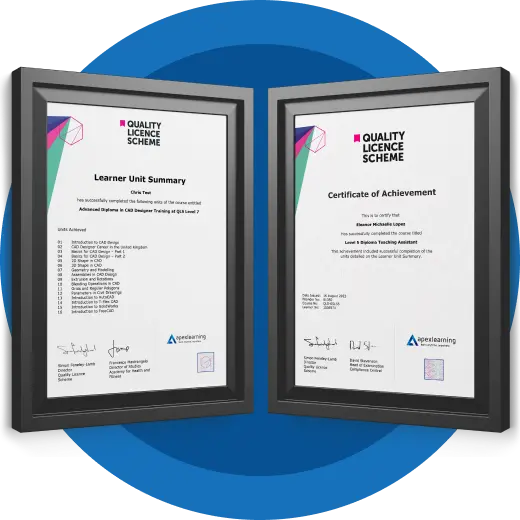
After successfully completing the course, learners will be able to order an Advanced Diploma in Professional Photography at QLS Level 7 endorsed certificate as proof of their new achievement. QLS Endorsed certificates can be ordered and get delivered to your home by post for £139 only . There is an additional £10 postage charge for international delivery.
Career Path
The Professional Photography Diploma opens doors to multiple creative careers, including:
- Freelance Photographer
Shoot weddings, portraits, or events for private clients.
UK Salary: £25,000 – £50,000+ - Photo Editor
Work with digital media, magazines, or e-commerce.
UK Salary: £24,000 – £40,000 - Content Creator
Produce image-led content for brands, blogs, and social channels.
UK Salary: £23,000 – £45,000 - Stock Photographer
Sell your images online for passive income.
Monthly Earnings: £500 – £2,000+ - Photography Business Owner
Launch your own studio or online service.
Potential Earnings: £30,000 – £100,000+
Structured into 37 in-depth modules, the Professional Photography Diploma offers comprehensive training in photography—from beginner to professional level. Topics include:
- Understanding DSLR, mirrorless, and smartphone cameras
- Exposure, white balance, focus, and lighting
- Portrait, landscape, street, event, and product photography
- Editing with Photoshop, Lightroom, Snapseed, and mobile tools
- Business essentials: pricing, branding, and selling stock photos
- Building a professional portfolio and working with clients
Whether you’re looking to become a freelance photographer, start a content creation business, or work with agencies, this Professional Photography Diploma provides the foundation to succeed.
By the end of the Professional Photography Diploma, you will be able to:
- Operate a camera confidently in manual and auto modes
- Apply photography principles across various styles and settings
- Edit images using Photoshop CC, Lightroom, Snapseed, and more
- Use lighting and composition to enhance visual storytelling
- Build and present a professional portfolio for clients or employers
- Launch a freelance photography business and sell your work online
Understand copyright, image licensing, and pricing strategies
By enrolling in the Professional Photography Diploma, you gain career-ready photography skills that align with UK industry standards. Whether you’re a beginner, creative freelancer, or professional content creator, this CPD photography course helps you:
- Learn at your own pace, anytime, anywhere
- Access course materials from desktop, mobile, or tablet
- Receive a CPD QS Accredited Certificate to boost your CV
- Build a portfolio and skillset from scratch
- Learn how to start a photography business or offer freelance services
The Professional Photography Diploma is ideal for:
- Beginners and aspiring photographers seeking structured training
- Creative professionals wanting to expand into visual media
- Freelancers and entrepreneurs building a photography service
- Social media influencers and content creators seeking quality images
- Bloggers and marketers managing their own brand visuals
There are no formal entry requirements. This Professional Photography Diploma is open to:
- Anyone passionate about photography
- Learners with basic digital literacy
- Users of DSLR, mirrorless, or smartphone cameras
Upon completing the course and passing the final exam, you will receive a CPD QS Accredited Certificate from Apex Learning. This certification demonstrates your knowledge and skills as a nursing assistant in the UK. The Digital version of the certificate is available for £9.99 only, and you can order a hard copy of the certificate for £14.99 only.
After successfully completing the course, learners will be able to order an Advanced Diploma in Professional Photography at QLS Level 7 endorsed certificate as proof of their new achievement. QLS Endorsed certificates can be ordered and get delivered to your home by post for £139 only . There is an additional £10 postage charge for international students.
The Professional Photography Diploma opens doors to multiple creative careers, including:
- Freelance Photographer
Shoot weddings, portraits, or events for private clients.
UK Salary: £25,000 – £50,000+ - Photo Editor
Work with digital media, magazines, or e-commerce.
UK Salary: £24,000 – £40,000 - Content Creator
Produce image-led content for brands, blogs, and social channels.
UK Salary: £23,000 – £45,000 - Stock Photographer
Sell your images online for passive income.
Monthly Earnings: £500 – £2,000+ - Photography Business Owner
Launch your own studio or online service.
Potential Earnings: £30,000 – £100,000+
Professional Photography Diploma | CPD Accredited Photography Course Online – UK
The photography industry is worth over £2.5 billion in the UK—and it continues to grow. Whether you’re a creative looking to monetise your talent or a beginner wanting to master the camera, the Professional Photography Diploma is your gateway to the world of professional photography. This CPD-accredited online photography course provides a complete learning journey—from camera settings and lighting to editing, portfolio development, and selling your work.
Course Overview
Structured into 37 in-depth modules, the Professional Photography Diploma offers comprehensive training in photography—from beginner to professional level. Topics include:
- Understanding DSLR, mirrorless, and smartphone cameras
- Exposure, white balance, focus, and lighting
- Portrait, landscape, street, event, and product photography
- Editing with Photoshop, Lightroom, Snapseed, and mobile tools
- Business essentials: pricing, branding, and selling stock photos
- Building a professional portfolio and working with clients
Whether you’re looking to become a freelance photographer, start a content creation business, or work with agencies, this Professional Photography Diploma provides the foundation to succeed.
Learning Outcomes
By the end of the Professional Photography Diploma, you will be able to:
- Operate a camera confidently in manual and auto modes
- Apply photography principles across various styles and settings
- Edit images using Photoshop CC, Lightroom, Snapseed, and more
- Use lighting and composition to enhance visual storytelling
- Build and present a professional portfolio for clients or employers
- Launch a freelance photography business and sell your work online
Understand copyright, image licensing, and pricing strategies
Why Enrol in This Course?
By enrolling in the Professional Photography Diploma, you gain career-ready photography skills that align with UK industry standards. Whether you’re a beginner, creative freelancer, or professional content creator, this CPD photography course helps you:
- Learn at your own pace, anytime, anywhere
- Access course materials from desktop, mobile, or tablet
- Receive a CPD QS Accredited Certificate to boost your CV
- Build a portfolio and skillset from scratch
- Learn how to start a photography business or offer freelance services
Who is This Course for?
The Professional Photography Diploma is ideal for:
- Beginners and aspiring photographers seeking structured training
- Creative professionals wanting to expand into visual media
- Freelancers and entrepreneurs building a photography service
- Social media influencers and content creators seeking quality images
- Bloggers and marketers managing their own brand visuals
Prerequisites
There are no formal entry requirements. This Professional Photography Diploma is open to:
- Anyone passionate about photography
- Learners with basic digital literacy
- Users of DSLR, mirrorless, or smartphone cameras
Assessment Method
Assessment for the course is conducted through an automated multiple-choice exam. A score of 60% is required to pass and earn the CPD Accredited Certificate. Reflective assignments are provided to enhance your learning, with expert tutor feedback available.
Certification
Upon completing the course and passing the final exam, you will receive a CPD QS Accredited Certificate from Apex Learning. This certification demonstrates your knowledge and skills as a nursing assistant in the UK. The Digital version of the certificate is available for £9.99 only, and you can order a hard copy of the certificate for £14.99 only.
Endorsed Certificate from the Quality Licence Scheme
After successfully completing the course, learners will be able to order an Advanced Diploma in Professional Photography at QLS Level 7 endorsed certificate as proof of their new achievement. QLS Endorsed certificates can be ordered and get delivered to your home by post for £139 only . There is an additional £10 postage charge for international students.
Career Path
The Professional Photography Diploma opens doors to multiple creative careers, including:
- Freelance Photographer
Shoot weddings, portraits, or events for private clients.
UK Salary: £25,000 – £50,000+ - Photo Editor
Work with digital media, magazines, or e-commerce.
UK Salary: £24,000 – £40,000 - Content Creator
Produce image-led content for brands, blogs, and social channels.
UK Salary: £23,000 – £45,000 - Stock Photographer
Sell your images online for passive income.
Monthly Earnings: £500 – £2,000+ - Photography Business Owner
Launch your own studio or online service.
Potential Earnings: £30,000 – £100,000+
Frequestly Asked Questions
What is the Professional Photography Diploma?
It’s a CPD-accredited online photography course covering camera skills, editing, and business techniques for aspiring photographers.
Is this course beginner-friendly?
Yes. No prior experience is needed—this course starts from the basics.
Do I need a DSLR?
Not at all. You can use any camera, including a smartphone.
What editing tools will I learn?
You’ll use Photoshop CC, Lightroom, Snapseed, and Google Photos.
Is the certificate recognised in the UK?
Yes. It is CPD QS Accredited and respected across creative industries.
How do I enrol?
Click ‘Enrol Now’ on our website for instant access.
It’s a CPD-accredited online photography course covering camera skills, editing, and business techniques for aspiring photographers.
Yes. No prior experience is needed—this course starts from the basics.
Not at all. You can use any camera, including a smartphone.
You’ll use Photoshop CC, Lightroom, Snapseed, and Google Photos.
Yes. It is CPD QS Accredited and respected across creative industries.
Click ‘Enrol Now’ on our website for instant access.
Course Curriculum
- 38 sections
- 76 lectures
- 00:00:00 total length
-
 Introduction to the Photography Masterclass 00:03:00
 -
How Does a Camera Work 00:01:00
-
Lecture Types 00:02:00
-
Intro to Exposure 00:02:00
-
What is Aperture 00:08:00
-
What is Shutter Speed 00:04:00
-
What is ISO 00:06:00
-
The Exposure Triangle 00:09:00
-
Using the Exposure Meter 00:09:00
-
Metering Modes – Advanced Lesson 00:03:00
-
Exposure Compensation – Advanced Lesson 00:04:00
-
Dynamic Range – Advanced Lesson 00:03:00
-
HDR and Bracketing – Advanced Lesson 00:02:00
-
Reading a Histogram 00:02:00
-
What is an Exposure 00:01:00
-
Exposure Modes 00:09:00
-
Intro to Activities 00:01:00
-
Activity – Exposure 00:01:00
-
Intro to Composition 00:01:00
-
The Rule of Thirds 00:03:00
-
Negative Space 00:02:00
-
Leading Lines 00:03:00
-
Symmetry and Balance 00:02:00
-
Perspective and Angles 00:07:00
-
Backgrounds 00:03:00
-
Activity – Composition 00:01:00
-
Advanced – Shooting Portraits with Wide vs Telephoto Lenses 00:01:00
-
Intro to Focus and Depth of Field 00:01:00
-
Understanding Depth of Field 00:03:00
-
How to Get a Blurrier Background 00:02:00
-
Manual vs Auto Focus 00:03:00
-
Auto Focus Modes 00:05:00
-
Getting Sharp Focus on Fast Moving Objects 00:03:00
-
What is Bokeh 00:01:00
-
Viewfinder Focus 00:01:00
-
Activity – Fast Objects 00:01:00
-
Intro to Camera Anatomy 00:01:00
-
The Main Camera Features 00:05:00
-
Camera Scene Modes 00:03:00
-
File Types and Formats 00:09:00
-
DSLR va Mirrorless Cameras 00:03:00
-
The Sensor 00:06:00
-
Continuous and Burst Modes 00:02:00
-
Resolution and Quality 00:03:00
-
Intro to White Balance and Color 00:01:00
-
What is White Balance 00:03:00
-
The Kelvin Light Temperature Scale 00:04:00
-
Automatic Balance Modes 00:03:00
-
Color Modes and In-Camera Adjustments 00:03:00
-
Light Spectrum and Theory 20 hours ago more 00:02:00
-
Using Colors Creatively 00:03:00
-
Black and White Photography 00:04:00
-
Activity – Creative Color 00:01:00
-
Advanced – Custom White Balance 00:03:00
-
Intro to Lighting 00:02:00
-
Using Natural Light 00:08:00
-
Using Natural Light a Window 00:03:00
-
Using Artificial Light 00:07:00
-
Using the on Board Camera Flash 00:03:00
-
Using an External Flash 00:10:00
-
Using a Light Kit 00:04:00
-
Creative Lighting 00:05:00
-
Activity – Lighting 00:01:00
-
Intro to Mobile Photography 00:02:00
-
Using a Smartphone Camera 00:03:00
-
Exposing Properly With the Smartphone Camera 00:01:00
-
Tips for Shooting With Your Mobile Camera 00:04:00
-
Shooting in Low Light With a Smartphone 00:07:00
-
Mobile Camera Accessories 00:02:00
-
Using Portrait Mode 00:03:00
-
Intro to Cameras 00:01:00
-
Camera Types 00:03:00
-
What is Your Budget 00:03:00
-
How and Where to Buy a Camera 00:02:00
-
What is the Best Beginner Camera 00:06:00
-
How to Build Out Your Camera Kit 00:03:00
-
Introducing Our Chats 00:01:00
-
A Chat About Buying a New Camera 00:21:00
-
Intro to Lenses 00:01:00
-
A Deeper Dive into Focal Length 00:07:00
-
A Deeper Dive Into Aperture 00:05:00
-
Primes vs Zooms 00:06:00
-
Prime vs Zoom – Quality Comparison 00:02:00
-
Upgrading Your Lenses – Kit vs Pro 00:01:00
-
Lens Stabilization 00:03:00
-
Filter Demonstration 00:03:00
-
Specialty and Creative Lenses 00:04:00
-
How to Clean Your Camera Lens 00:06:00
-
Intro to Camera Accessories 00:01:00
-
Memory Cards 00:04:00
-
Batteries 00:02:00
-
Stabilization 00:04:00
-
Flashes and Lights 00:02:00
-
Camera Bags 00:03:00
-
Hard Drives 00:03:00
-
Sam’s Favorite Bags 00:03:00
-
Intro to Scenarios 00:01:00
-
Intro and Tips for Portrait Photography 00:02:00
-
Portrait Photo Demo 00:08:00
-
Intro and Tips for Long Exposure Photography 00:02:00
-
Daytime Long Exposure Demo 00:19:00
-
Activity – Portrait 00:01:00
-
Nighttime Long Exposure 00:09:00
-
Activity – Long Exposure 00:01:00
-
Intro and Tips for Landscape Photography 00:02:00
-
Landscape Photo demo 00:07:00
-
Activity – Landscape 00:01:00
-
Intro and Tips for Product Photography 00:03:00
-
Product Photo Demonstration with Natural Light 00:07:00
-
Product Photography with Lights 00:03:00
-
Adding a Refiection 00:02:00
-
DIY Light Box 00:05:00
-
Activity – Product 00:01:00
-
Editing Product Photos 00:14:00
-
Intro and Tips for Low Light Photography 00:02:00
-
Low Light Demo 00:08:00
-
Activity – Low light 00:04:00
-
Intro and Tips for Sports and Action Photography 00:02:00
-
Sports Photography 00:08:00
-
Activity – Action and Sports 00:01:00
-
Intro and Tips for Macro Photography 00:02:00
-
Macro Photography Demo 00:05:00
-
Activity – Macro 00:01:00
-
Street Photo demo 00:04:00
-
Activity – Street and Architecture 00:01:00
-
Intro to Event Photography 00:02:00
-
A Chat About Event Photography 00:04:00
-
Bring the Right Tools 00:05:00
-
Be Aware of Your Surrounding 00:05:00
-
Be Quick With Your Settings 00:05:00
-
Capture the Details 00:04:00
-
An Overview of Shooting a Wedding 00:10:00
-
Activity – Events 00:01:00
-
Intro to Drone Photography 00:01:00
-
Our Recommended Drone Equipment 00:06:00
-
Drone Tips 00:06:00
-
Drone Demo 00:12:00
-
Activity – Aerial Photography 00:01:00
-
Intro and for Night Photography 00:01:00
-
Night Photo Demo 00:04:00
-
Activity – Night 00:01:00
-
Intro to Editing 00:01:00
-
Activity – Photo Editing 00:01:00
-
Intro Photoshop 00:05:00
-
Opening Photos in Photoshop CC 00:05:00
-
Cropping in Photoshop CC 00:03:00
-
White Balance in Photoshop CC 00:04:00
-
Proper Photo Editing Workflow in Photoshop Photoshop CC 00:06:00
-
Exposure Photoshop CC 00:03:00
-
Color and Saturation in Photoshop CC 00:04:00
-
Sharpening and Noise Reduction in Photoshop CC 00:06:00
-
Tone Curve in Photoshop CC 00:03:00
-
Effects – Vignettes, Grain, Dehaze in Photoshop CC 00:04:00
-
Saving and Exporting in Photoshop CC 00:08:00
-
HSL and Grayscale in Photoshop CC 00:05:00
-
Split Toning in Photoshop CC 00:03:00
-
Lens Corrections in Photoshop CC 00:06:00
-
Spot and Blemish Removal in Photoshop CC 00:04:00
-
Targeted Adjustments in Photoshop CC 00:05:00
-
Straighten and Transform Tools in Photoshop CC 00:03:00
-
Graduated, Radial, Brush Filters in Photoshop CC 00:08:00
-
Range Masks in Photoshop CC 00:07:00
-
Full Landscape Edit in Photoshop CC 00:15:00
-
Full Portrait in Photoshop CC 00:11:00
-
Cropping in Photoshop CC 00:04:00
-
Layer Panel Workflow in Photoshop CC 00:02:00
-
Making Photo Adjustment in Photoshop CC 00:11:00
-
Removing Background from Photo in Photoshop CC 00:08:00
-
Favorite Tools for Manipulating Photos in Photoshop CC 00:10:00
-
Exporting from Photoshop CC 00:04:00
-
Editing Togather an HDR Photo in Photoshop CC 00:03:00
-
Intro to Lightroom Classic CC 00:05:00
-
Importing and Organizing in Lightroom Classic CC 00:11:00
-
Crop and Rotate Lightroom Classic CC 00:05:00
-
White Balance in Lightroom Classic 00:08:00
-
Exposure in Lightroom Classic CC 00:06:00
-
Color and Saturation in Lightroom Classic CC 00:04:00
-
Sharpening and Noise Reduction in Lightroom Classic CC 00:07:00
-
Vignettes, Grain and Dehaze in Lightroom Classic CC 00:06:00
-
Exporting in Lightroom Classic CC 00:10:00
-
Lens Corrections in Lightroom Classic CC 00:05:00
-
Split Tone in Lightroom Classic CC 00:05:00
-
Removing Blemishes With the Heal and Clone Tools in Lightroom Classic CC 00:08:00
-
Graduated, Radial and Brush Adjustments in Lightroom Classic CC 00:10:00
-
Adjustment Brush Presets in Lightroom Classic CC 00:03:00
-
Range Masks in Lightroom Classic CC 00:05:00
-
Full Edit – Portrait in Lightroom Classic CC 00:19:00
-
Full Edit – Black and White Action in Lightroom Classic CC 00:09:00
-
Intro to Lightroom CC 00:03:00
-
Import and Organize in Lightroom CC 00:10:00
-
Crop and Rotate in Lightroom CC 00:03:00
-
White Balance and Saturation in Lightroom CC 00:06:00
-
Light – Exposure and Tone Curve in Lightroom CC 00:08:00
-
Color Mixer in Lightroom CC 00:02:00
-
Effects in Lightroom CC 00:05:00
-
Split Toning in Lightroom CC 00:01:00
-
Details in Lightroom CC 00:05:00
-
Optics in Lightroom CC 00:03:00
-
Geometry in Lightroom CC 00:04:00
-
Exporting and Sharing Lightroom CC 00:02:00
-
Healing and Clone Brushes in Lightroom CC 00:04:00
-
Brush Adjustments Lightroom CC 00:04:00
-
Radial and Linear Gradients Lightroom CC 00:05:00
-
Advanced Optione and Presets in Lightroom CC 00:04:00
-
Full Edit – Night Photo in Lightroom CC 00:11:00
-
Full Edit – Portrait in Lightroom CC 00:14:00
-
Editing Photos in Your Web Browses With Lightroom CC 00:03:00
-
Intro to Mac Photos 00:02:00
-
Importing and Organizing Mac Photos 00:07:00
-
Cropping and Rotating in Mac Photos 00:05:00
-
Exposure Adjustments in Mac Photos 00:04:00
-
White Balance in Mac Photos 00:06:00
-
Color, Saturation, HSL in Mac Photos 00:06:00
-
Noise Reduction and Sharpening in Mac Photos 00:07:00
-
Vignettes, Contrast, Black and White in Mac Photos 00:06:00
-
Exporting in Mac Photos 00:06:00
-
Full Edit -Portrait in Mac Photos 00:10:00
-
Full Edit – Landscape in Mac Photos 00:09:00
-
Intro to Google Photos 00:02:00
-
Importing and Organizing in Google Photos 00:04:00
-
Editing Photos in Google Photos in Google photos 00:07:00
-
Downloading and Sharing in Google Photos 00:03:00
-
Full Edit – Macro in Google Photos 00:05:00
-
Full Edit – Landscape in Google Photos 00:06:00
-
Intro to Photoshop Express 00:01:00
-
Importing and Understanding the Workspace in Photoshop Express 00:04:00
-
The Editing Workspace and Applying Filters in Photoshop Express 00:03:00
-
Crop and Rotate in Photoshop Expressle 00:03:00
-
Editing Photos in Photoshop Express 00:07:00
-
Red Eye Removal, Text and Frames in Photoshop Express 00:04:00
-
Removing Blemishes 00:01:00
-
Saving and Exporting in Photoshop Express 00:02:00
-
Creating Collages in Photoshop Express 00:05:00
-
Full Edit – Landscape in Photoshop Express 00:05:00
-
Full Edit – Product Photo in Photoshop Express 00:05:00
-
Intro to Snapseed 00:01:00
-
Opening Photos and Navigating the App 00:05:00
-
Making Adjustments and Editing Exposure 00:05:00
-
Cropping 00:02:00
-
White Balance 00:02:00
-
Details and Sharpening 00:02:00
-
Tone Curves 00:03:00
-
Rotate, Perspective and Expand 00:04:00
-
Making Edits to Selected Parts of an Image 00:04:00
-
Removing Blemishes and Healing Brush 00:01:00
-
Snapseed Photo Styles 00:07:00
-
Text and Frames 00:02:00
-
Saving and Exporting 00:03:00
-
Full Portrait Edit 00:06:00
-
Intro to Sharing 00:02:00
-
Online Platforms for Photographers 00:09:00
-
Having Success on Instagram 00:07:00
-
Activity – Portfolio 00:01:00
-
Creating a Portfolio with Wix 00:17:00
-
Chat about Having an Online Presence 00:07:00
-
Chat about Getting More Followers 00:05:00
-
A Chat about Best Web Platforms for Photographers 00:06:00
-
Intro to Starting a Photography Business 00:01:00
-
Starting a Photo Business 00:04:00
-
Finding Your First Client 00:05:00
-
Payments and Accounting 00:02:00
-
How Much Should You Charge 00:05:00
-
Contracts 00:03:00
-
Income and Expense Tracking 00:03:00
-
A Chat About Getting our First Clients 00:06:00
-
A Chat About the Gear You Need to Start a Business 00:03:00
-
A Chat About How Much You Should Charge 00:09:00
-
Intro to Stock Photography 00:01:00
-
The Best Stock Photos Sites to Sell on 00:02:00
-
Selling Stock Photography on Your Own 00:03:00
-
How Licensing 00:04:00
-
How to Print Your Photos 00:03:00
-
How Big Can You Print Your Photos 00:02:00
-
Framing 00:02:00
-
Intro and Tips for Wildlife Photography 00:02:00
-
Wildlife Photography Demonstration 00:06:00
-
Photo Chat – Sam’s Archipelago Trip 00:05:00
-
Activity – Nature 00:01:00
-
Thank You and Conclusion Video 00:03:00
-
Get your qls level 7 Certificate 00:00:00
-
Thank you for completing your course with us! We’d appreciate your feedback! 00:00:00
£21.99
£419
Save 95% - Sale Ends in

This course includes:
-
Duration:20 hours, 27 minutes
-
Access:1 year access
-
Level:
-
CPD Points:10